
Touch Screen Laptops: Factors To Consider For Performance, Display, And Battery Life

Display Characteristics: Touch Technology, Panels, and Color Metrics
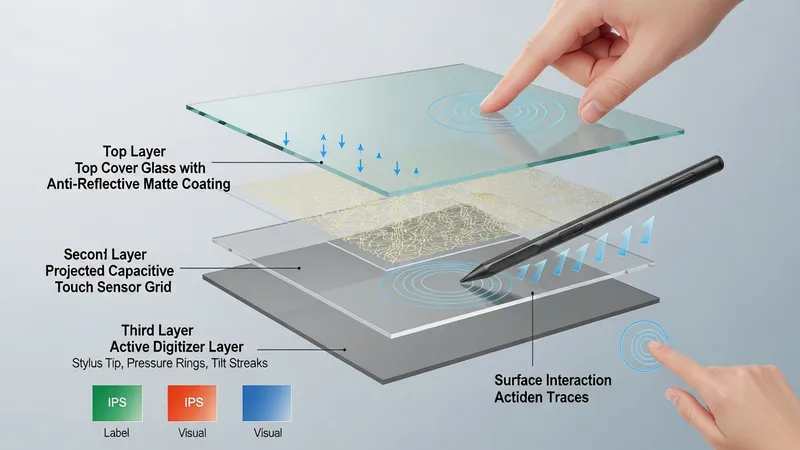
Touch screen implementation typically uses projected capacitive sensors or active digitizer layers for stylus input. Projected capacitive touch is common for finger interaction and supports multi-touch gestures, while active digitizers add pen input with pressure sensitivity and tilt recognition in some models. The presence of an active pen requires compatible hardware and driver support. Touch overlays and digitizers can affect panel reflectivity and optical clarity; manufacturers may choose brighter backlights or anti-reflective coatings to maintain readability. Understanding the type of touch subsystem is important for workflows that rely on precise pen input versus casual touch navigation.
Panel technology choices—such as IPS, OLED, or VA—shape color accuracy, contrast ratio, and viewing angles. IPS panels typically offer consistent color and wide viewing angles with moderate contrast. OLED panels can deliver higher contrast and deeper blacks but may vary in peak brightness and can influence power draw depending on content. Resolution and pixel density determine the level of detail; higher pixel counts can improve image fidelity but may require interface scaling, which some applications handle differently. Refresh rate is another variable: some laptops offer 90 Hz or higher, which can improve motion smoothness but may increase energy consumption.
Color metrics like color gamut coverage (sRGB, Adobe RGB, DCI-P3) and Delta E accuracy are relevant for color-sensitive work. Devices intended for content creation often specify wider gamut coverage and factory calibration, whereas mainstream models may prioritize general-purpose accuracy. Brightness, measured in nits, affects outdoor readability and the degree to which a touch panel remains usable in ambient light. Anti-glare or matte coatings can reduce reflections but may slightly alter perceived sharpness. Users who work frequently under varied lighting may weigh brightness and coating choices more heavily.
Display choices also interact with battery life and system design. For instance, higher-resolution displays and OLED panels can increase power draw in certain usage patterns, which may shorten runtime compared with lower-resolution or lower-brightness alternatives. Touch-enabled displays add a small constant power draw for the digitizer, and active pen features may require additional power when polling the pen for proximity and pressure. When evaluating devices, it can be helpful to consider typical content types, whether color-critical tasks are frequent, and how display characteristics may affect overall endurance in day-to-day use.