
Cash-Out Refinance Calculator: Estimating Potential Loan Amounts And Equity Access

A calculator designed for cash-out refinancing scenarios models how much of a property’s equity might be converted into loan proceeds. It typically combines inputs such as a current estimate of property value, the outstanding principal on existing mortgage(s), and a lender’s allowable loan-to-value (LTV) limit to produce an estimated new loan amount and the potential proceeds after satisfying existing liens. The tool’s output often reflects simplified assumptions about interest rates, loan term, and upfront costs so users can compare hypothetical outcomes without personalized underwriting or final offers.
In practice, these calculators translate user-supplied figures into a few standard outputs: the maximum permitted loan based on an LTV cap, an estimate of available proceeds after paying off current balances, and an indicative monthly payment given a selected rate and term. Calculations may handle one or multiple existing mortgages, and they can account for closing costs or prepaid items if those fields are included. Results typically represent estimates only and do not replace lender underwriting, title review, or appraisal processes.
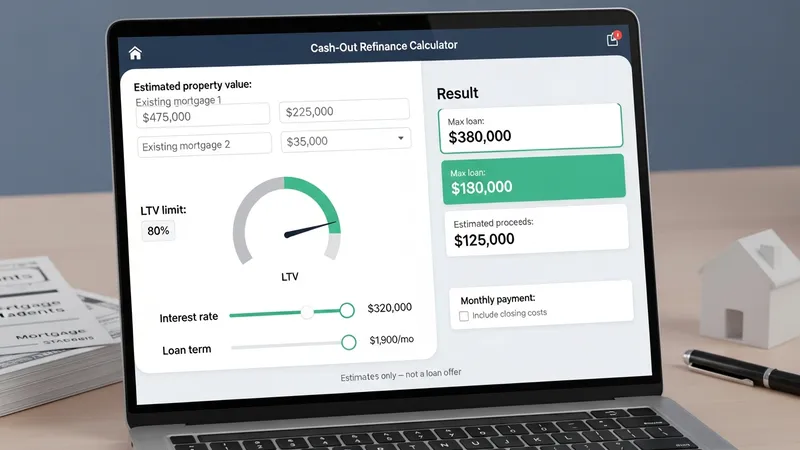
- Lender online calculators — Web-based tools provided by mortgage lenders that accept property value, existing balance, and desired LTV to produce estimated loan size and proceeds; functionality varies by provider and may include basic cost fields.
- Third-party mortgage estimator tools — Independent calculators hosted by financial education sites or aggregators that often allow scenario comparisons, amortization previews, and sensitivity testing across rates and LTVs.
- Custom spreadsheet templates — User-maintained worksheets that apply formulas for available equity, new loan sizing, amortization schedules, and proceeds after estimated closing costs; these templates may be adapted for multiple scenarios and documentation.
Comparing these example tools highlights common modeling differences. Lender calculators may limit options to their product set and may implicitly assume certain fees or underwriting standards. Third-party tools often prioritize comparison and sensitivity analysis, enabling side-by-side rate or term adjustments. Spreadsheet templates provide the most transparency because formulas are visible and editable; however, they require more user input and validation. Users employing any tool should view estimates as illustrative, since final eligibility and amounts depend on formal appraisal, credit, and underwriting determinations.
Input sensitivity is central to interpretation. Small changes in assumed property value, existing loan balance, or the chosen LTV percentage can materially alter the estimated proceeds and new payment. For example, an increase in the assumed LTV cap will increase potential loan size but also raise the new loan-to-value exposure. Likewise, selecting a longer repayment term typically lowers the estimated monthly payment but can increase total interest over the life of the loan in modeled scenarios. These patterns are consistent across many calculator designs.
Calculators may incorporate fees and adjustments in different ways. Some subtract estimated closing costs and prepaid items from the gross proceeds to show net available funds, while others present gross loan size and require separate manual deduction of costs. Treatment of mortgage insurance, origination points, and escrow reserves also varies; some tools allow line-item entries, while simpler versions do not. Careful attention to which costs are included in a given tool helps avoid misinterpreting the presented proceeds or payment figures.
Another common analytical feature is scenario comparison. Running multiple scenarios with varied rates, terms, or assumed property values can reveal how sensitive proceeds and payments are to each factor. Sensitivity testing may show, for example, that modest rate increases reduce feasible proceeds if a target payment or LTV is constrained. These exercises can inform planning and help users identify assumptions that warrant verification with formal lender quotes and appraisals.
In summary, these calculators are modeling aids that translate property value, outstanding balances, LTV policies, and cost assumptions into indicative loan sizes, estimated proceeds, and payment illustrations. They may vary in transparency and input detail; therefore, results should be treated as preliminary estimates rather than underwriting outcomes. The next sections examine practical components and considerations in more detail.