
Bookkeeping Software: Understanding Core Modules For Small Business Accounting

Bookkeeping software for small business accounting refers to applications that capture, categorize, and store financial transactions and related records. These systems typically include modules that handle sales invoicing, expense recording, bank and card transactions, general ledger entries, and basic reporting. The software’s core purpose is to maintain an organized set of financial records that can be used for internal tracking, statutory reporting, tax preparation, and routine reconciliation tasks.
In practice, a bookkeeping platform groups functionality into distinct modules that interact: a ledger module holds account structures; an invoicing module records receivables; an expense or payables module records bills and outflows; and reconciliation tools match external statements to recorded transactions. Modules may exchange data via automated feeds, import tools, or manual entry, and they often provide role-based access so small teams can segregate duties for control and review.
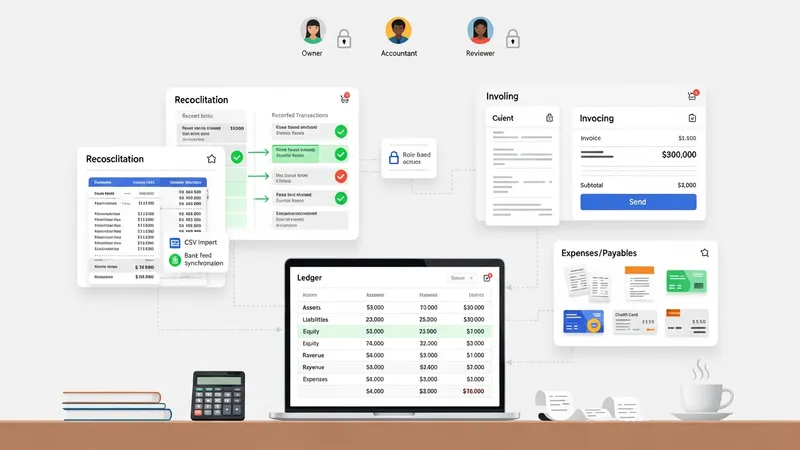
- Invoicing and accounts receivable module — creates and tracks customer invoices, records payments, and maintains aging lists for outstanding invoices.
- Expense and accounts payable module — records supplier bills, manages expense receipts, and tracks payment schedules for payables.
- Bank reconciliation and ledger management module — matches bank or card statements to recorded entries, adjusts ledger balances, and maintains charts of accounts.
Bookkeeping modules often differ in how they handle automation versus manual control. For example, automated bank feeds may import transactions daily, which can reduce repetitive entry but typically require periodic review to ensure correct categorization. Manual import or CSV upload remains common where automatic feeds are unavailable or when businesses use specialized payment processors. The choice between automation and manual workflows may affect review frequency, internal controls, and training needs for staff who maintain records.
Integration is another common consideration when evaluating bookkeeping modules. Modules that can exchange data with payroll, inventory, point-of-sale, or tax-filing tools may reduce duplicate work and improve consistency across records. Integration may be achieved through built-in connectors, third-party middleware, or simple data export/import functions. Each approach may influence how quickly transaction flows are reflected in financial reports and how much reconciliation work remains.
Reporting and analytics modules typically offer a set of standard outputs such as profit-and-loss statements, balance sheets, and cash flow summaries. These reports may be generated on demand or scheduled periodically. For small businesses, concise, regularly produced reports can provide visibility into revenue trends, expense patterns, and cash positions. Report configuration often allows filtering by date range, project, or departmental dimension, which can assist internal review without suggesting specific business actions.
Security, access control, and audit trails are frequently built into bookkeeping modules to support reliable record-keeping. Role-based permissions can limit who may create, edit, or approve entries, and audit logs may show who changed a record and when. Such controls may be particularly helpful for small teams that share accounting responsibilities and need clear accountability paths while preparing records for external review or tax compliance.
In summary, bookkeeping software for small business accounting is organized around interrelated modules that manage invoices, expenses, reconciliations, ledgers, and reporting. Each module may offer varying degrees of automation, integration, and control that can influence record accuracy and administrative burden. The next sections examine practical components and considerations in more detail.