
Attorney Software: Key Features For Law Firm Case Management

Integration, automation, and workflow design for law practice systems
Integration with existing productivity and court systems can reduce repetitive data entry and improve consistency across tasks. Typical integrations include email clients for matter-linked communication capture, calendar services for shared scheduling, accounting systems for financial reconciliation, and e-signature platforms for document execution. When integrations are available, they often rely on standardized connectors or APIs; when not, firms may use export/import routines or middleware to bridge gaps. The choice to integrate is often balanced against complexity and ongoing maintenance needs.
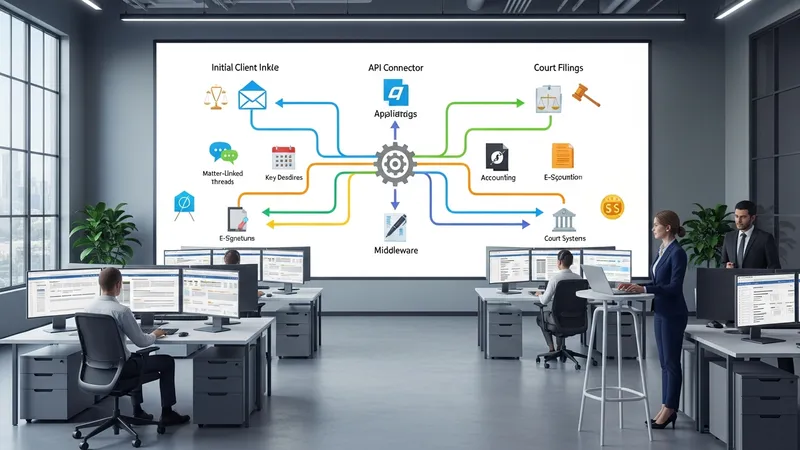
Workflow automation may involve routing new matters to intake staff, triggering task sequences for standard filings, or generating document drafts from templates once certain fields are completed. Automation rules are commonly designed to handle routine or predictable steps, which can free staff for higher-value tasks. However, automation requires governance—documented rules, exception handling procedures, and periodic review to ensure that automated sequences remain aligned with evolving practice requirements.
Designing workflows typically starts with mapping existing processes to identify decision points and handoffs. Clear definitions of who is responsible for each task and what constitutes task completion help reduce ambiguity. Firms often pilot automated workflows in a single practice area to validate assumptions before broader deployment, allowing adjustments to templates, notifications, and escalation paths without major disruption.
When planning integrations and automations, teams commonly consider long-term maintainability. This includes documenting custom logic, tracking version changes, and ensuring staff who manage automation rules have access to necessary training. Periodic audits of automated processes can reveal opportunities for refinement or identify maintenance needs as templates and external requirements change.